
All Topics
- Alchemizing Music Concepts for Students
- Anuv Jain Songs
- Artist Spotlight
- artium gift card
- Artium Maestros
- Artium News
- Artium Tech Blog
- Best Coke Studio Songs
- Best Female Singers
- Birthday songs
- Bollywood Love Songs
- buying guide
- Carnatic Music
- Child Singers
- Devotional Music
- Editorials by Ananth Vaidyanathan
- English Love Songs
- Festival
- Film Music
- Ghazal Music
- Guitar
- Hindustani Classical Music
- Indian Classical Music
- Indian Folk Music
- Insights
- Instagram Reels Viral Songs
- Instruments
- Karaoke
- Karaoke Singing
- Keyboard
- Kids Music
- maestros
- Music Education
- Music for Kids
- Music Games
- Music Industry
- Music Instruments
- Music Legends
- Music Press Release
- Music Technology
- Music Theory
- Music Therapy
- Music Tools
- Piano
- piano guide
- Songs
- South Devotional Music
- Success Stories
- Tamil Film Music
- Telugu Film Music
- Time Theory
- Tools
- Uncategorized
- Uncategorized
- Uncategorized
- Uncategorized
- Vocal Range
- Vocal Singing
- Vocals
- western classical music
- western music
- Western vocal music
Artium Tech Blog, Music Technology
The Technology Behind Real-Time Music Learning at Artium
The Technology Behind Real-Time Music Learning at Artium
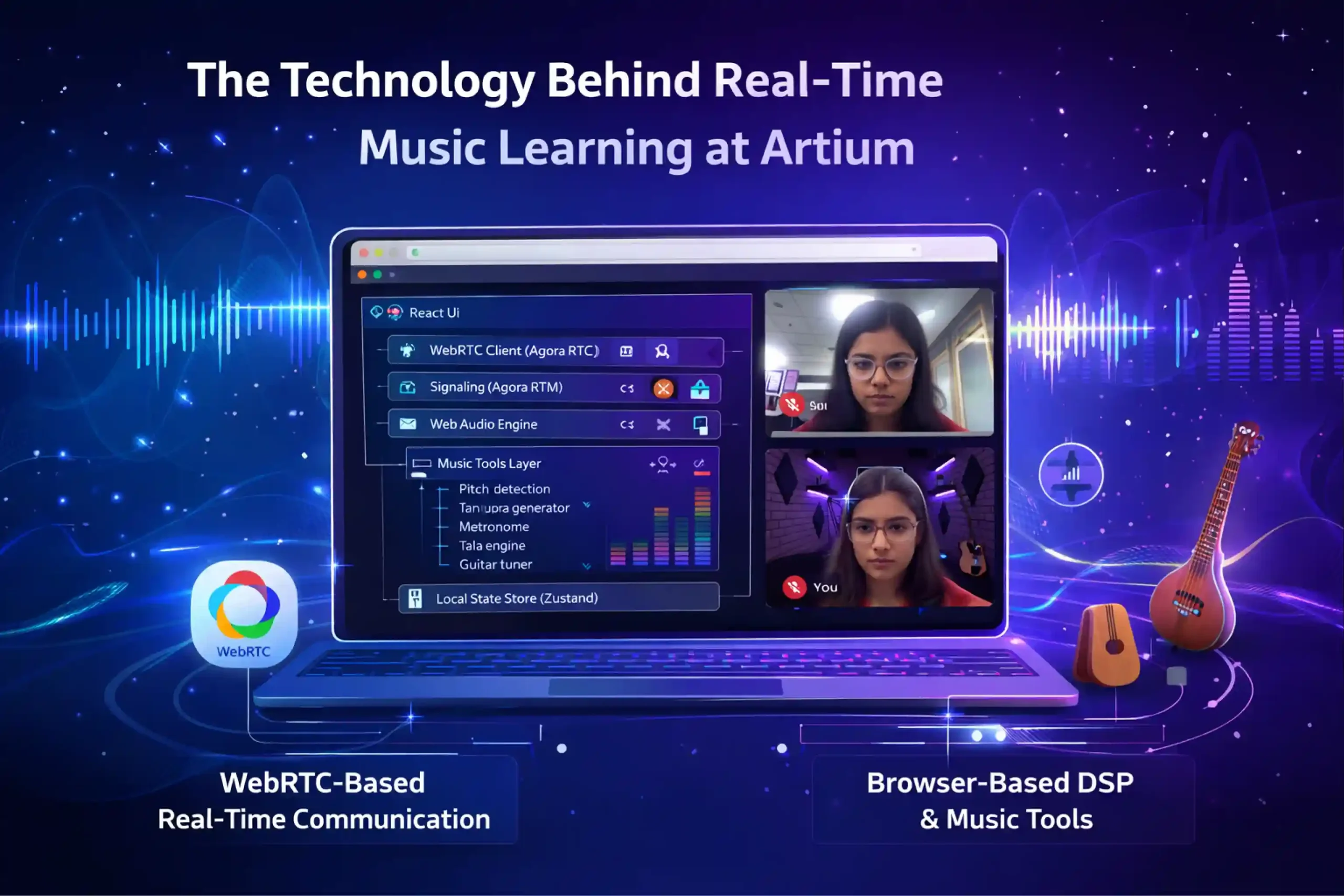
Table of Contents
“The only truth is music… Music blends with the heartbeat universe, and we forget the brain beat.” — Jack Kerouac
What does it take to make an online music lesson feel as natural as sitting beside a guru in the same room? The answer lies in carefully engineered technology that powers truly real-time music learning. Every lesson is built to minimize latency, ensuring that teachers and students hear each note almost instantly, an essential factor when practicing rhythm, call-and-response, or improvisation.
High-pitch accuracy tools help instructors detect subtle variations in notes, allowing precise feedback that sharpens a learner’s ear. Crystal-clear audio fidelity preserves the richness of instruments and vocals, while optimized streaming ensures strong visual clarity, allowing teachers to observe posture, hand movements, and technique. Behind the scenes, intelligent audio processing, adaptive streaming, and low-lag communication systems work together seamlessly.
The result? A digital classroom where technology fades into the background, and the music takes center stage
The Problem: Video Calls Are Not Designed for Music
Most video conferencing platforms were never built for music. They were designed for meetings, presentations, and conversations, where speech intelligibility is the priority rather than musical precision. For a casual conversation, systems can tolerate delays and compressed sound. But music is far less forgiving.
Imagine a student trying to repeat a phrase after a teacher. If the sound arrives even slightly late, rhythm breaks instantly. In most speech platforms, 150–200 ms latency is perfectly acceptable. In music learning, however, anything above 80 ms becomes noticeable, and beyond 120 ms, it becomes nearly impossible to maintain rhythm.
This is where music technology faces very different constraints:
| Requirement | Why does it matter? |
|---|---|
| Latency | Keeps the rhythm synchronized between the teacher and learner |
| Pitch accuracy | Enables precise vocal correction and note training |
| Audio fidelity | Preserves the harmonic richness of instruments and voice |
| Visual clarity | Allows teachers to observe posture, hand gestures, and fingering |
For example, when a student practices a gamak in Carnatic music or a meend in Hindustani music, subtle pitch bends matter. If the platform compresses audio too aggressively, those delicate nuances disappear. Similarly, a piano or guitar lesson requires teachers to clearly see finger placement, and a blurry video simply cannot support this.
Behind the scenes, solving this problem is not just about a better internet. It demands specialized engineering. Real-time music learning introduces two major technological challenges:
- Low-latency media transport – ensuring audio and video travel between teacher and student with minimal delay.
- Local audio processing in the browser – handling pitch detection, echo control, and sound optimization without adding lag.
To achieve this, modern music-learning platforms rely on advanced streaming protocols, adaptive bitrate technology, and intelligent audio pipelines that prioritize sound quality over aggressive compression.
The result is a digital classroom where the technology works quietly in the background, while rhythm stays tight, pitch stays accurate, and the learning experience feels as close as possible to sitting beside a guru.
System Architecture: The Technology Stack Powering Real-Time Music Learning
Behind every seamless Artium music class is a carefully designed technology stack that behaves less like a typical video call and more like a live digital music studio. The platform combines WebRTC-based real-time communication with powerful browser-based audio DSP (Digital Signal Processing) to ensure that sound, rhythm, and feedback travel instantly between the teacher and the learner.
At the heart of the experience is the browser client, where most of the heavy lifting actually happens.
Browser Client
├─ React UI
├─ WebRTC Client (Agora RTC)
├─ Signaling (Agora RTM)
├─ Web Audio Engine
├─ Music Tools Layer
│ ├─ Pitch detection
│ ├─ Tanpura generator
│ ├─ Metronome
│ ├─ Tala engine
│ └─ Guitar tuner
└─ Local State Store (Zustand)
The React UI creates a responsive interface that enables students to interact with lessons, teachers, and practice tools. Underneath that interface, WebRTC through Agora RTC handles real-time audio and video streaming with extremely low latency. Meanwhile, Agora RTM signaling coordinates session connections, allowing teachers and students to join lessons instantly.
But the real magic happens in the Web Audio Engine. This layer allows the browser itself to process sound in real time. Instead of sending audio to distant servers for analysis, the system performs music-specific tasks locally through a Music Tools Layer.
This layer includes tools designed specifically for musicians:
- Pitch detection to help identify whether a note is sharp or flat
- A Tanpura generator that provides the continuous drone essential for Indian classical practice
- A Metronome to maintain tempo
- A Tala engine to support rhythmic cycles in classical music
- A Guitar tuner to ensure instruments stay perfectly tuned
To keep everything responsive, the application state is managed using Zustand, a lightweight local state store that ensures fast updates without slowing the interface.
Interestingly, the server plays a very small role in the system design.
Backend
├─ Token generation
├─ Session orchestration
└─ analytics
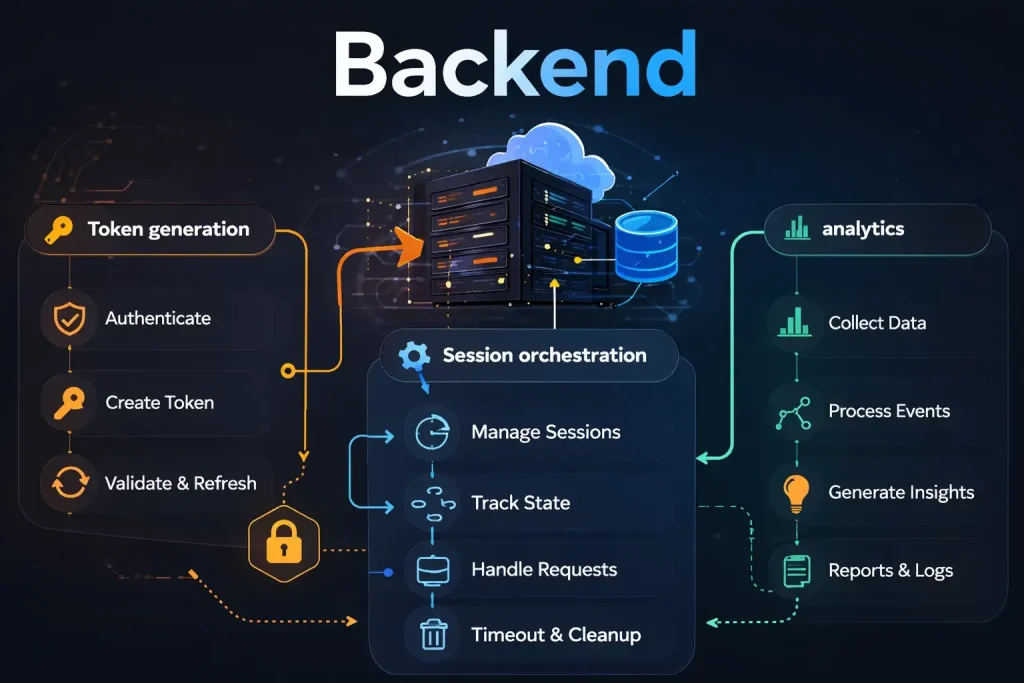
The backend primarily handles token generation, session orchestration, and analytics. Everything else, especially the heavy music computation, runs directly on the user’s device.
This design choice is intentional. By running all music computation client-side, the platform eliminates unnecessary round-trips to servers, dramatically reducing latency. The result is a responsive environment where pitch feedback, rhythm cues, and musical tools react almost instantly.
In other words, instead of the internet doing the music processing, your browser becomes the music engine, making real-time learning not just possible, but truly musical.
Why Did We Choose Agora Instead of Raw WebRTC?
Running a real-time music platform is far more complex than simply connecting two people on video. If we were to run the entire WebRTC infrastructure ourselves, the engineering team would have to manage multiple layers of networking technology, each critical to maintaining smooth audio and video communication.
This would involve operating and maintaining:
- STUN Servers
These help devices discover their public network addresses so they can establish a direct connection with another user across different networks. Without STUN, many users behind home routers or firewalls would struggle to connect. - TURN Servers
When a direct peer-to-peer connection isn’t possible, TURN servers act as relays, passing media traffic between participants. While essential for reliability, they are bandwidth-heavy and require significant infrastructure to operate efficiently. - SFU (Selective Forwarding Unit)
An SFU routes media streams between multiple participants in a session. It decides which streams go where, ensuring that everyone receives the right audio and video feeds without overwhelming the network. - Network Adaptation
Internet conditions constantly fluctuate. Systems must dynamically adjust video resolution, audio quality, and data flow to maintain stable communication even as bandwidth changes. - Scaling Infrastructure
As more learners join sessions worldwide, the system must scale seamlessly across regions to maintain consistent performance and low latency.
Managing all of this internally would mean a large portion of engineering time being spent on network infrastructure rather than on building better music-learning tools.
This is where Agora plays a crucial role. Their platform provides:
- Global SFU infrastructure – optimized servers distributed worldwide for fast media routing
- Automatic bitrate adaptation – adjusts audio and video quality based on real-time network conditions
- Congestion control – intelligently manages data flow to prevent network overload
- Packet loss recovery – restores missing audio packets to maintain smooth sound transmission
By relying on this robust communication layer, the engineering team can focus on what truly matters. Building music-layer tools that improve pitch detection, rhythm training, and the overall learning experience for musicians.
The Audio Pipeline: Designing the Browser Audio Graph
One of the toughest engineering challenges in building a real-time music learning platform was creating a browser-based audio graph capable of performing multiple complex tasks simultaneously. Unlike normal voice calls, music lessons require the system to listen, analyze, generate sound, and transmit audio, all without a delay.
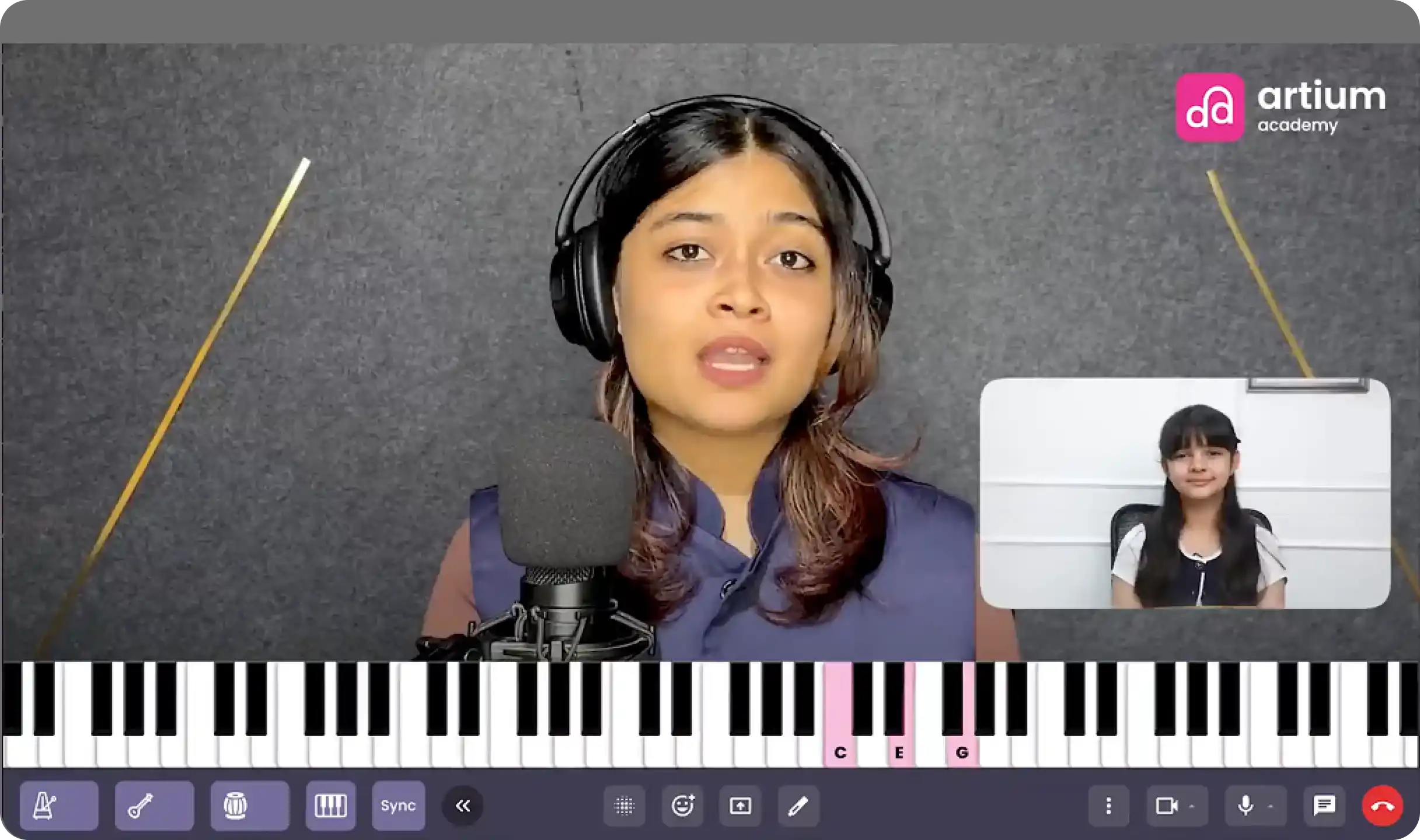
The browser audio graph had to simultaneously:
- Analyze pitch so teachers and learners can identify whether notes are accurate
- Generate instruments like tanpura or tabla that support musical practice
- Mix the tool-generated audio with the student’s live voice or instrument
- Stream voice to WebRTC so the teacher hears the learner instantly
All of this happens in real time, inside the browser, without relying on remote servers.
The architecture of the audio flow looks like this:
Audio Graph
Microphone
│
AnalyserNode
│
Pitch Detection
Channel Splitter
│
Agora Audio Track
│
Channel Merger
├─ Tanpura
├─ Metronome
├─ Tabla
│
Merged Tool Audio
Here’s how each part works:
- Microphone Input
The process begins with the learner’s microphone capturing live voice or instrument sound. - AnalyserNode
This component examines the audio signal in real time, extracting frequency data needed for musical analysis. - Pitch Detection
The analyzed signal is used to detect the exact pitch being sung or played, helping the system identify whether the note matches the intended swara or tone. - Channel Splitter
The audio stream is divided so it can be processed in parallel for different purposes. - Agora Audio Track
One path sends the learner’s voice directly to the WebRTC communication layer so the teacher can hear it with minimal latency. - Channel Merger
Another path merges additional tool-generated sounds into the audio stream. - Music Tool Sources
Several practice tools feed into this merger, including:- Tanpura for the continuous drone used in Indian classical music
- Metronome to maintain tempo
- Tabla rhythms to support rhythmic practice
- Merged Tool Audio
These generated sounds combine into a single audio layer that can accompany the learner during practice.
In practice, the system runs two parallel audio paths at the same time:
- Voice → WebRTC
The learner’s live voice or instrument is transmitted directly to the teacher in real time. - Tools → Local Playback + WebRTC
Practice tools, such as a tanpura or a metronome, are played locally for the student while also available in the shared session.
This dual-path architecture allows students to practice with musical tools while maintaining a clean, low-latency voice channel for instruction, making the online lesson feel far closer to a real studio session.
Gain Staging
One of the early challenges we encountered during development was audio balance. When practice tools like tanpura, metronome, or tabla are played alongside the lesson, their sound sometimes overpowers the teacher’s voice, making it difficult for learners to clearly hear instructions. In a music class, the teacher’s guidance must always remain the most prominent element.
To solve this, we implemented a simple but effective gain staging strategy:
- Voice Gain = 1.0
- Tool Gain = 0.3
This approach intentionally keeps the teacher’s voice louder than the instrument tools in the audio mix. As a result, practice sounds remain supportive rather than distracting. The system mirrors how real classrooms function, with the instructor’s voice naturally leading the session while instruments and accompaniment stay in the background, guiding the learner without overwhelming the lesson.
Pitch Detection Implementation
A key feature of the platform is the Swar Meter, which performs real-time pitch detection during lessons. This tool helps learners understand whether the note they are singing or playing matches the intended pitch. In classical music training, even small pitch variations can change the quality of a note, so the system must detect frequencies accurately and instantly.
To build this capability, we evaluated two primary algorithms commonly used for pitch detection.
FFT vs. Autocorrelation
1. FFT (Fast Fourier Transform) – Spectral Peak Detection
Pros
- Simple implementation that converts the audio signal into its frequency components
- Fast to compute, making it attractive for real-time systems
Cons
- Sensitive to harmonics, meaning it can sometimes misidentify the true fundamental frequency
- When multiple harmonic overtones are present, as in vocals or acoustic instruments, the algorithm may pick a stronger harmonic instead of the actual pitch
2. Autocorrelation
Pros
- More robust for monophonic signals, where a single note is being sung or played
- Works particularly well for vocals, which makes it suitable for many music-learning scenarios
Con
- Slightly heavier computational load compared to FFT
After evaluating both approaches, we chose autocorrelation. Its ability to handle vocal signals reliably made it the better fit for music education. While it requires a bit more computation, running the algorithm directly in the browser enables the Swar Meter to provide stable, accurate pitch feedback in real time, helping learners refine their notes with confidence.
Autocorrelation Implementation
To power the Swar Meter’s real-time pitch detection, the platform uses an autocorrelation algorithm that runs continuously through the browser’s AnalyserNode. The goal is to detect pitch accurately while keeping the system responsive enough for live lessons. The process unfolds in several structured steps.
Step 1: Capture Samples
The first step is collecting the raw audio waveform from the microphone. This is done using:
analyser.getFloatTimeDomainData(buffer)
The system captures a buffer of 4096 audio samples.
At a 44.1 kHz sample rate, this represents a time window of approximately 93 milliseconds.
This window is long enough to detect the periodic structure of musical notes while still remaining fast enough for real-time analysis.
Step 2: Silence Detection
Before performing pitch detection, the system checks whether the frame actually contains meaningful sound. This is done by calculating the RMS (Root Mean Square) energy of the signal:
rms = sqrt(sum(sample²) / N)
If the computed value falls below 0.01, the frame is discarded.
This step is important because background noise, microphone hiss, or room ambience could otherwise trigger false pitch detections.
Step 3: Autocorrelation
Once the frame is confirmed to contain valid audio, the algorithm computes autocorrelation values across the buffer.
For lag values:
lag = 0 → N
The correlation is calculated as:
corr(lag) = Σ buffer[i] * buffer[i + lag]
This process compares the signal with delayed versions of itself. When the signal aligns with its own repeating pattern, the correlation value peaks.
The first strong peak in this function corresponds to the fundamental period of the note.
Step 4: Convert Period → Frequency
Once the fundamental period is known, converting it to pitch is straightforward:
frequency = sampleRate / lag
This gives the note’s frequency in Hertz, which can then be mapped to the nearest musical note or swara.
Step 5: Parabolic Interpolation
To further improve accuracy, the system performs parabolic interpolation around the detected peak. Instead of relying only on discrete lag values, this step estimates the precise peak location between samples.
The result is cent-level pitch precision, allowing the Swar Meter to detect very small pitch deviations without increasing the FFT window size or incurring computational overhead.
Mapping Pitch to Indian Classical Notes
Indian classical music is based on relative pitch, rather than fixed absolute notes. This means each learner chooses a comfortable base note called “Sa”, and all other swars are calculated relative to that reference.
For example:
Sa = C4 = 261.63 Hz
Once the base note is defined, the remaining swars map to specific semitone offsets:
- Sa = 0
- Re = 2
- Ga = 4
- Ma = 5
- Pa = 7
- Dha = 9
- Ni = 11
When the system detects a pitch from the learner’s voice or instrument, it converts it to a cent deviation from the expected swara.
The calculation used is:
cents = 1200 * log2(freq / reference)
This helps measure how close the sung note is to the correct pitch. The interface then provides simple visual feedback:
- ±10 cents → Green (accurate pitch)
- ±25 cents → Yellow (slightly off)
- >25 cents → Red (needs correction)
This clear visual guide helps students instantly understand and adjust their pitch during practice.
Representing Beats in the Tala Engine
To digitally recreate the rhythmic structure of Indian classical music, the Tala Engine represents each beat as a structured object in code. Instead of treating rhythm as a simple sequence of clicks, the system stores additional musical information about every beat in the cycle.
Each beat contains properties that describe its position, role in the tala, and the gesture associated with it:
{
beatIndex: 1,
anga: “laghu”,
accent: “strong”,
gesture: “tap”
}
- BeatIndex identifies the position of the beat within the tala cycle.
- Anga defines the rhythmic unit to which it belongs, such as Laghu, Dhrutam, or Anudhrutam.
- An accent indicates whether the beat carries a strong or weak emphasis.
- A gesture represents a traditional physical action used in classical rhythm practice, such as a tap, a clap, or a wave.
Using these structured objects, the system generates a complete rhythmic cycle as an ordered array:
[beat1, beat2, beat3 … beatN]
This structured representation allows the platform to accurately render rhythm patterns, animate gestures, and synchronize metronome cues during practice sessions.
Why JavaScript Timers Failed?
In the early implementation of the metronome, the system used standard JavaScript timing functions, such as setInterval(), to trigger beats at regular intervals. While this approach works well for many web applications, it proved unreliable for music timing.
JavaScript timers run on the main browser thread, which also handles UI rendering, user interactions, and other scripts. When the CPU is under load, such as during video streaming, audio processing, or interface updates, these timers can drift by 10–50 milliseconds.
In normal applications, this delay may go unnoticed, but in music, even small timing errors are significant. Such drift causes beats to shift slightly over time, resulting in unstable rhythm and inconsistent tempo. For a metronome, where precise timing is essential, this behavior breaks the rhythmic accuracy required for effective musical practice.
Web Audio Scheduling
To achieve accurate rhythmic timing, the system moved away from standard JavaScript timers and implemented a lookahead scheduler using the Web Audio API. This approach allows beats to be scheduled in advance while still adapting to real-time conditions.
The scheduler runs at regular intervals:
- Scheduler interval: 25 ms
- Lookahead window: 100 ms
Within this window, upcoming beats are prepared in advance.
Pseudo code representation:
while nextBeatTime < currentTime + lookahead
scheduleBeat(nextBeatTime)
Each beat is scheduled precisely using:
oscillator.start(time)
This timing is aligned with the AudioContext clock, which operates independently of the browser’s main thread. Because the audio engine controls playback timing, the metronome maintains a stable rhythm and consistent tempo, even when the UI or CPU load fluctuates.
Synchronizing Teacher and Student Tools
In a real-time music lesson, practice tools such as the metronome or tanpura must remain perfectly synchronized for both the teacher and the student. If these tools start at different moments or run at slightly different tempos, the learning experience quickly becomes confusing.
To ensure synchronization, the platform uses an RTM (Real-Time Messaging) signaling protocol. When a teacher activates a tool, a structured message is sent to the student’s client.
Example message:
{
type: “toolSync”,
tool: “metronome”,
action: “start”,
bpm: 120
}
This message instructs the student’s system to activate the same tool with the specified parameters.
The client then follows a simple flow:
RTM message
↓
update Zustand state
↓
start audio scheduler
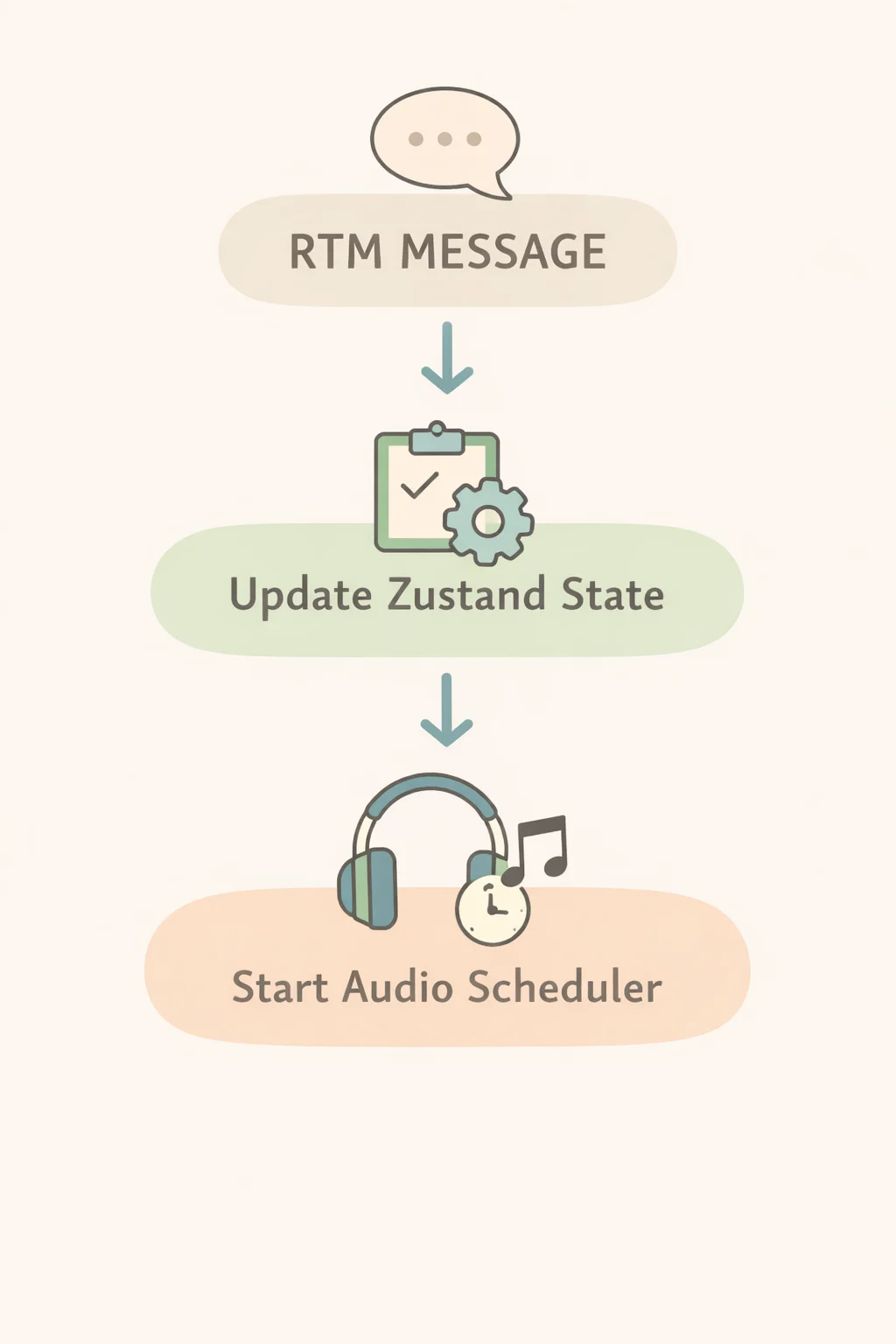
By updating the shared state first and then triggering the audio scheduler, both clients begin playback in a coordinated manner, keeping tools aligned throughout the lesson.
What We Learned?
Building a real-time music learning platform revealed that delivering a seamless musical experience online requires much more than standard video communication. Careful engineering decisions around audio processing, timing, and user interaction were essential to ensure that rhythm, pitch, and teaching tools worked reliably during live lessons. Through experimentation and iteration, several important insights emerged that shaped the system architecture and learning experience.
Key Engineering Lessons
- Browser audio APIs are powerful enough for DSP
- Autocorrelation works better than FFT for vocals
- Web Audio clock is essential
- Music UX must be domain-specific
- Separate signaling and media pipelines
Together, these principles helped create an online music learning platform that uses technology to support the learning process while keeping the focus firmly on music.
FAQs
Artium Academy delivers lag-free music lessons online using a robust, low-latency technology stack built for real-time interaction. Our platform leverages optimized audio streaming, intelligent buffering, and Web Audio–based processing to ensure high-quality sound with minimal delay. We prioritize audio over video to maintain clarity during live sessions, while adaptive network handling keeps lessons stable across varying internet speeds. Features like real-time pitch detection, metronome sync, and guided practice tools enhance learning. This tech-first approach ensures students experience seamless, interactive online music classes without disruptions.
Regular video conferencing platforms aren’t designed for the precision that live music learning requires. They prioritize speech by compressing audio, filtering frequencies, and suppressing background sound, often cutting out important musical details like tone, dynamics, and sustain. They also introduce latency, which makes real-time singing or playing together difficult. At Artium, our tech-enabled platform is built specifically for music. We use optimized audio streaming, minimal processing, and real-time sync tools to preserve sound quality and reduce lag, ensuring students experience seamless, interactive online music lessons.
Artium’s tech-enabled classroom integrates intelligent musical tools designed for real-time learning. Features like pitch detection help students instantly identify if they’re singing or playing in tune, while a built-in metronome ensures steady tempo. A tanpura generator provides the essential drone for Indian classical practice, and a tala engine supports rhythmic cycles. For instrumentalists, tools like a guitar tuner ensure accurate tuning. Combined with low-latency audio and guided feedback, these tools make online music classes interactive, precise, and highly effective for learners at every level.
At Artium, real-time pitch detection is powered by advanced audio processing built into our tech-enabled learning platform. When a student sings or plays, the system captures the audio signal and uses algorithms like autocorrelation to instantly identify the frequency of the note. This is then mapped to the nearest musical swara or pitch and compared with the expected note. Students receive immediate visual and audio feedback, helping them correct sharp or flat notes. This real-time guidance makes online music classes more interactive, accurate, and effective for building pitch precision.
At Artium, WebRTC technology plays a key role in delivering seamless online music lessons. Unlike traditional streaming, WebRTC enables low-latency, peer-to-peer audio transmission, which is essential for real-time interaction in music learning. It minimizes delay so teachers and students can sing or play in sync. Our tech stack further optimizes WebRTC by prioritizing high-quality audio over video, reducing compression, and maintaining clarity of musical tones. This ensures accurate pitch, rhythm, and dynamics, making online music classes feel closer to in-person sessions.
At Artium, the tanpura and metronome are synchronized using a shared timing engine built on a unified audio clock. Both teacher and student devices align to the same tempo and cycle through low-latency signaling, ensuring beats and drone stay in sync. The platform minimizes drift with real-time clock correction and lightweight data exchange, so even across networks, the rhythm and drone remain consistent. This ensures seamless practice, accurate timing, and a cohesive live lesson experience.
Music teachers prefer Artium Academy’s platform because it’s built specifically for music learning, not generic video calls. It offers low-latency audio, superior sound clarity, and tools like real-time pitch detection, metronome sync, and structured lesson flows. Unlike standard platforms, it preserves musical nuances and enables accurate feedback. Combined with a seamless teaching interface and curriculum support, Artium helps teachers deliver more effective, engaging, and professional online music classes.
Music technology is transforming learning across genres by making it accessible, personalized, and interactive. Tools like real-time pitch detection, AI feedback, digital instruments, and low-latency platforms enable students to learn classical, film, jazz, or contemporary styles with precision from anywhere. Structured online classes and practice tools accelerate progress while maintaining consistency.
Looking ahead, the future will bring AI-driven coaching, immersive AR/VR lessons, smarter practice analytics, and global collaboration, making music learning more intuitive, data-driven, and engaging across all genres.